
Form liên hệ và bản đồ
Mở màn hình
Form liên hệ có sẵn ở trang Liên hệ. Mẫu mã form / lịch nằm ở Cấu hình web → Quản lý thẻ html, nút Liên hệ (số 5).
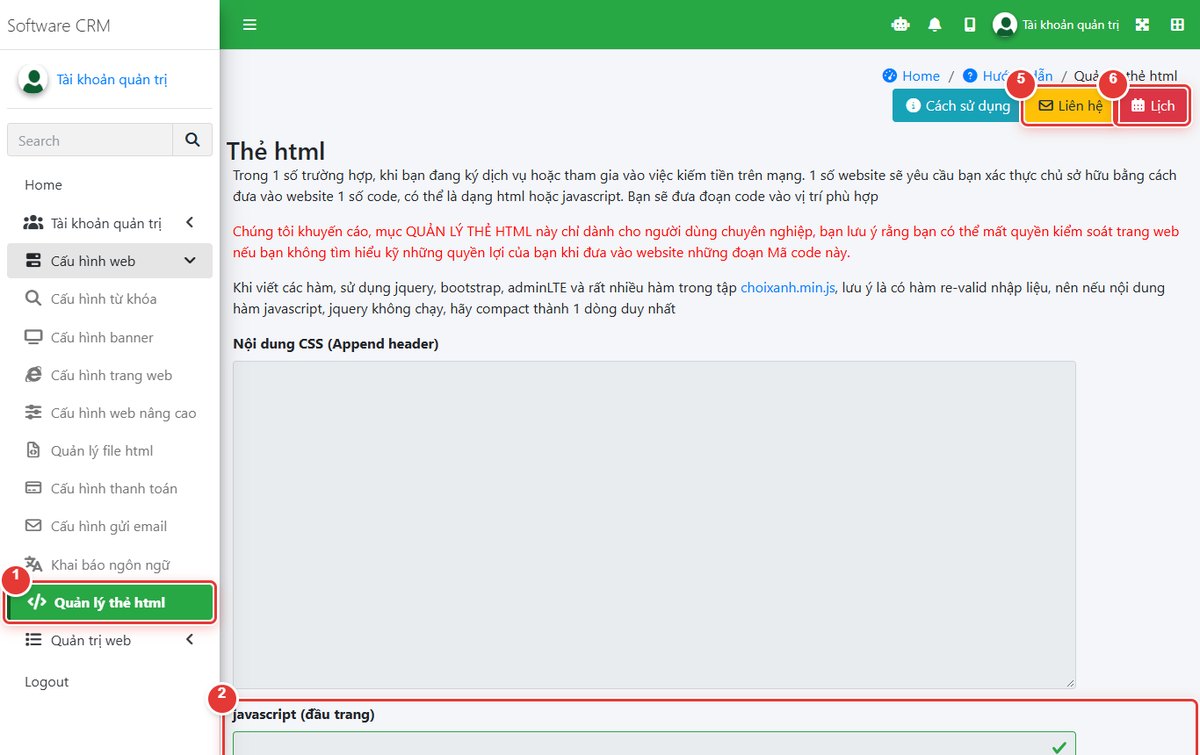
Lưu ý: trang Liên hệ dựng bằng mã HTML; đừng mở trang đó bằng khung soạn thảo rồi bấm Lưu — khung soạn thảo có thể lọc mất form và bản đồ. Cần đổi địa chỉ / bản đồ thì nhờ Chồi Xanh.
Form liên hệ .frmlienhe
Nguyên tắc chung
Vào Quản trị web > Quản trị nội dung nút bấm với chức năng Liên hệ, tại Ô nhập liệu chi tiết , nhập nội dung theo chế độ Kích hoạt nhanh hoặc chế độ Thiết kế html
Hệ thống sẽ render form và submit về /ww1/save.lienhe.ashx.
Mặc định hệ thống đã render application/ld+json như sau:
Copy <!-- Schema.org JSON-LD: Organization + ContactPoint --><script type='application/ld+json'>{'@context': 'https://schema.org','@type': 'Organization','name': 'Công ty TNHH Tư Vấn Dịch Vụ Chơi Xanh','url': 'https://choixanh.net','email': 'info@choixanh.net','telephone': '+84-28-3974-3179','taxID': '0317775768','address': {'@type': 'PostalAddress','streetAddress': '85 Tân Cảng, P. Thạnh Mỹ Tây','addressLocality': 'Thành phố Hồ Chí Minh','addressCountry': 'VN'},'contactPoint': [{'@type': 'ContactPoint','contactType': 'customer support','telephone': '+84-28-3974-3179','email': 'info@choixanh.net','areaServed': 'VN','availableLanguage': ['vi','en']}],'sameAs': ['https://www.facebook.com/choixanh','https://www.youtube.com/@choixanh']}</script>1 Kích hoạt nhanh
Vào Quản trị web > Quản trị nội dung nút bấm với chức năng Liên hệ, tại Ô nhập liệu chi tiết , nhập nội dung html code sau:
Copy noidungformlienheMã html tham khảo để copy vào khung Ô nhập liệu chi tiết của form Liên hệ có trang trí cơ bản
Copy <div class='p-4 p-md-5'><div class='d-flex align-items-center mb-3'><span class='me-2 d-inline-flex align-items-center justify-content-center rounded-circle'style='width:40px;height:40px;background:#e9f5ff;'><i class='fa-solid fa-building text-primary'></i></span><h2 class='h5 m-0'>Thông tin liên hệ</h2></div><p class='text-muted mb-3'>Cảm ơn quý khách đã mua hàng tại website. Vui lòng liên hệ theo thông tin sau:</p><ul class='list-unstyled mb-4 small'><li class='d-flex mb-2'><i class='fa-solid fa-briefcase me-2 mt-1 text-primary'></i><strong>Công ty TNHH Tư Vấn Dịch Vụ Chơi Xanh</strong></li><li class='d-flex mb-2'><i class='fa-solid fa-location-dot me-2 mt-1 text-primary'></i>85 Tân Cảng, P. Thạnh Mỹ Tây, TP.HCM</li><li class='d-flex mb-2'><i class='fa-solid fa-id-card me-2 mt-1 text-primary'></i>MST: 0317775768</li><li class='d-flex mb-2'><i class='fa-solid fa-phone me-2 mt-1 text-primary'></i>ĐT: <a href='tel:02839743179' class='link-body-emphasis'>028 3974 3179</a></li><li class='d-flex'><i class='fa-solid fa-envelope me-2 mt-1 text-primary'></i>Email: <a href='mailto:info@choixanh.net' class='link-body-emphasis'>info@choixanh.net</a></li></ul><div class='d-flex gap-2 mb-4'><a href='tel:02839743179' class='btn btn-outline-primary btn-sm'><i class='fa-solid fa-phone me-1'></i> Gọi ngay</a><a href='mailto:info@choixanh.net' class='btn btn-primary btn-sm'><i class='fa-solid fa-paper-plane me-1'></i> Gửi email</a></div><hr class='my-4'/><h3 class='h6 mb-2'>Hoặc gửi liên hệ cho chúng tôi qua form sau</h3><p class='mt-2'>noidungformlienhe</p></div> Quy tắc rất đơn giản → đâu có noidungformlienhe hệ thống sẽ tự tìm và hiển thị form liên hệ mẫu.2 Thiết kế HTML
Trong trường hợp form liên hệ mặc định chưa đáp ứng được yêu cầu mà cần tùy chỉnh, có thể thiết kế html form liên hệ động. Phải nhập liệu đủ 2 vị trí trong box Ô nhập liệu chi tiết và HTML (trong footer) theo hướng dẫn sau:
2.1 Nơi render html liên hệ: Vào Quản trị web > Quản trị nội dung nút bấm với chức năng Liên hệ, tại Ô nhập liệu chi tiết , nhập nội dung html code sau:
Copy <div class='renderlienhe'>Nội dung form động</div> Tương tự chế độ kích hoạt nhanh, chế độ Thiết kế html cũng tuân theo quy tắc rất đơn giản → đâu có class với tên renderlienhe hệ thống sẽ tự tìm và hiển thị form liên hệ theo thiết kế.Mã html tham khảo để copy vào khung Ô nhập liệu chi tiết của form Liên hệ với form thiết kế html theo yêu cầu có trang trí cơ bản
Copy <div class='p-4 p-md-5'><div class='d-flex align-items-center mb-3'><span class='me-2 d-inline-flex align-items-center justify-content-center rounded-circle'style='width:40px;height:40px;background:#e9f5ff;'><i class='fa-solid fa-building text-primary'></i></span><h2 class='h5 m-0'>Thông tin liên hệ</h2></div><p class='text-muted mb-3'>Cảm ơn quý khách đã mua hàng tại website. Vui lòng liên hệ theo thông tin sau:</p><ul class='list-unstyled mb-4 small'><li class='d-flex mb-2'><i class='fa-solid fa-briefcase me-2 mt-1 text-primary'></i><strong>Công ty TNHH Tư Vấn Dịch Vụ Chơi Xanh</strong></li><li class='d-flex mb-2'><i class='fa-solid fa-location-dot me-2 mt-1 text-primary'></i>85 Tân Cảng, P. Thạnh Mỹ Tây, TP.HCM</li><li class='d-flex mb-2'><i class='fa-solid fa-id-card me-2 mt-1 text-primary'></i>MST: 0317775768</li><li class='d-flex mb-2'><i class='fa-solid fa-phone me-2 mt-1 text-primary'></i>ĐT: <a href='tel:02839743179' class='link-body-emphasis'>028 3974 3179</a></li><li class='d-flex'><i class='fa-solid fa-envelope me-2 mt-1 text-primary'></i>Email: <a href='mailto:info@choixanh.net' class='link-body-emphasis'>info@choixanh.net</a></li></ul><div class='d-flex gap-2 mb-4'><a href='tel:02839743179' class='btn btn-outline-primary btn-sm'><i class='fa-solid fa-phone me-1'></i> Gọi ngay</a><a href='mailto:info@choixanh.net' class='btn btn-primary btn-sm'><i class='fa-solid fa-paper-plane me-1'></i> Gửi email</a></div><hr class='my-4'/><h3 class='h6 mb-2'>Hoặc gửi liên hệ cho chúng tôi qua form sau</h3><p class='mt-2 renderlienhe'>Hệ thống sẽ render form liên hệ theo thiết kế html vào đây</p></div>2.2 Mã html form liên hệ: Vào Cấu hình web > Quản lý thẻ html tìm đến box nhập liệu HTML (trong footer), nhập nội dung:
Copy <form class='frmlienhe d-none'><div class='form-group form-floating mb-3'><input class='form-control' name='CustomerName' id='CustomerName' placeholder='Họ tên' required maxlength='500'><label for='CustomerName'>Họ tên</label></div><div class='form-group form-floating mb-3'><input type='email' class='form-control' name='EmailAddress' id='EmailAddress' placeholder='Email' maxlength='500' required><label for='EmailAddress'>Email</label></div><div class='form-group form-floating mb-3'><input class='form-control' name='Tel' id='Tel' placeholder='Điện thoại' maxlength='50' required><label for='Tel'>Điện thoại</label></div><div class='form-group form-floating mb-3'><input class='form-control' name='Address' id='Address' placeholder='Địa chỉ' maxlength='500'><label for='Address'>Địa chỉ</label></div><div class='form-group form-floating mb-3'><textarea class='form-control' name='Notice' id='Notice' placeholder='Nội dung' required maxlength='4000'></textarea><label for='Notice'>Nội dung</label></div><div class='form-group form-floating mb-3'><input class='form-control' name='t1' id='t1' placeholder='Nhập ngành muốn học' maxlength='1000'><label for='t1'>Ngành học</label></div><!-- Dạng select --><div class='mb-3 d-flex align-items-center gap-2'><label class='form-label mb-0' for='t2'>Chọn 1 sản phẩm trong danh sách</label><div class='t2-slot flex-grow-1 form-control' id='t2'data-url='/ww2/module.sanpham.ashx'data-type='select'data-id='35280'data-sl='30'data-pageid='1'><select name='t2' class='form-select'><option value=''>-- Chọn sản phẩm --</option></select></div></div><!-- Dạng checkbox --><div class='mb-3'><label class='form-label mb-1' for='t5'>Chọn nhiều sản phẩm</label><div class='t5-slot form-control' id='t5'data-url='/ww2/module.sanpham.ashx'data-type='checkbox'data-id='35279'data-sl='20'></div></div><!-- Dạng radio --><div class='mb-3'><label class='form-label mb-1' for='t6'>Chọn 1 sản phẩm</label><div class='t6-slot form-control' id='t6'data-url='/ww2/module.sanpham.ashx'data-type='radio'data-id='35278'></div></div><!-- Dạng lịch (calendar): chỉ chọn được ngày có sự kiện; data-id = LichSuKienIDParent (xem 2.3) --><div class='mb-3'><label class='form-label mb-1' for='t2'>Chọn ngày đặt tiệc</label><div class='t2-slot form-control' id='t2'data-url='/ww2/module.sanpham.json'data-type='calendar'data-locked='past'data-required='1'data-id='2'data-sl='100'data-pageid='1'></div></div><button type='submit' class='btn btn-primary mt-3'>Gửi đi</button><div class='cx-frmlienhe-status small mt-2' aria-live='polite'></div></form> Mở rộng t1..t100 (mỗi ô tối đa 1000 ký tự); form tự gửi nhãn tN_label và tên lựa chọn tN_pretty, liên hệ lưu dạng Nhãn: Tên lựa chọn (mã: giá trị) trong mục Các yêu cầu khác . Kiểu slot (data-type): select, checkbox, radio, calendar. Lịch: chỉ ngày trong khoảng ThoiGianBatDauHienThi..ThoiGianKetThucHienThi của bài viết chọn được (thiếu ngày kết thúc = chỉ ngày bắt đầu); data-locked='past' chặn ngày đã qua, 'future' chặn ngày tương lai; data-required='1' bắt buộc chọn.2.3 Đặt chỗ chống trùng (bàn tiệc, phòng, xe...): khai báo trong Quản lý thẻ html > TheHTMLTop (var/let/window đều được):
Copy <script>var BanHangIDParent = 5; // danh mục chứa tài nguyên (mỗi bài viết = 1 bàn/phòng/xe)var LichSuKienIDParent = 2; // danh mục chứa lịch sự kiện (mỗi bài viết = 1 sự kiện)var tbDaDatTruoc = 'Bàn này đã có người đặt, vui lòng chọn vị trí khác';</script>- data-id của ô lịch = LichSuKienIDParent, của ô bàn = BanHangIDParent (đổi danh mục thì đổi cả hai nơi).
- Đã đặt = có liên hệ cùng ngày + cùng bàn; xóa liên hệ thì bàn trống lại. Chọn ngày -> bàn đã đặt bị khóa; gửi trùng -> không lưu, báo tbDaDatTruoc.
- Không khai báo BanHangIDParent = tắt tính năng. API: /ww1/kiemtra.datcho.json?ngay=<mã>.
3 Kết quả trong trường hợp nếu cần trang trí html trả về
Sau khi submit về /ww1/save.lienhe.ashx, hệ thống sẽ tự động append phản hồi vào modal các lớp thẻ như sau: (Thành công và gửi mail được)
Copy <div class='modal fade show' id='thongbaoHeThongModal' tabindex='-1' aria-labelledby='thongbaoHeThongModalLabel' aria-modal='true' role='dialog' style='display:block;'> <div class='modal-dialog'> <div class='modal-content'> <div class='modal-header'> <h5 class='modal-title' id='thongbaoHeThongModalLabel'>Thông báo</h5> <button type='button' class='btn-close' data-bs-dismiss='modal' aria-label='Close'></button> </div> <div class='modal-body'>Cảm ơn đã liên hệ.</div> <div class='modal-footer'> <button type='button' class='btn btn-danger' data-bs-dismiss='modal'>Đóng</button> </div> </div> </div></div>| Trạng thái | JSON trả về |
|---|---|
| Không thành công | {'maloi':'0','ThongBao':'Không thể lưu liên hệ.'} |
| Thành công nhưng không gửi mail được | {'maloi':'0','ThongBao':'Đã lưu liên hệ, lỗi gửi mail.'} |
| Thành công và gửi mail được | {'maloi':'1','ThongBao':'Cảm ơn đã liên hệ.'} |